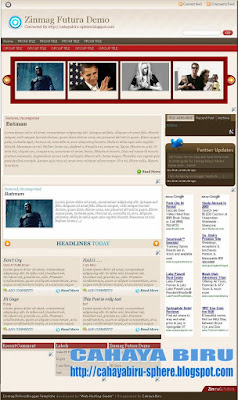
This day, I would like to launch Zinmag Futura Blogger Template. This template is originally from WP Theme and made by
Jinsona. Then I convert it to Blogger Tempate.
Thanks dude... for creating a very nice WP Themes.
Overview:
Name : Blogger Template Zinmag Futura
Original From : Zinmag Futura WP THEME
Original Author : Jinsona Designs
Converted to blogger by : Cahaya Biru
Template Feature :
1. Magazine Style with inline posting
2. Auto readmore included
3. Glide Content with up-down toggler
4. Slider with right-left toggler
5. Featured Post
6. Nice Chocolate Twitter Header
7. Post Focus included**
8. Menu
**Post Focus, its mean that you will not see the Slide, Glide, and Featured section when you enter the single post article. I have another name of it "
You can see me in front, but not in behind"... heheheh :D
Any theory about it?? tell me...
Clearly, The Slide, Glide, and Featured secton is all gone when you enter the single post article. Isn't it very nice dude .... :)

Clean and Nice Organized of Futura Page Element
On the other hand, when you go to page element, You will not see any pictures in there. This page element is really private setting for you... It is clean and well organized as a framework of your blog. In the same time, The featured, Glide, and Slide section, is locked. Every widget that locked have the same color with the background. So that you can not remove or drag-drop. Why?? Just because They are the special widgets of Zinmag Futura.
You could change the setting, but we are not recommend it, only if you know about HTML code. I bet you know better than me... :) how much.... 20 bucks...100 bucks... heheheh just kidding about the bet. I don't like gambling either... it is forbidden in my believe... :)
This template has been tested in following browser :
1. Mozilla 2.xx (running well, no overflow, but the slide link is not shown)
2. mozilla 3.0x (perfect)
3. Internet Explorer 6 (running well, no overflow, but png image not shown)
4. Opera 9.0 (find)
That old browser is only tested tools. New Versions of it will show better.
Let's see the demo, from your computer, right guys.... !!! :D
Customizing Featured Widget (MANUALLY)Oh.... well... now we are here.... Customizing Every Featured in Futura.
The Blogger Template Zinmag Futura is different from its versions in WP Theme. In WP themes, you can set all features into control panel by “semi-automatically”. But, in here, blogger, Zinmag Futura have to set manually.
Now I would like to explain how to customize the featured.
Customizing Menu0. Go to Layout -- Edit HTML
1. Find (Ctrl+F) this
- SUB-TITLE-LINK-ADDRESS
- GROUP-TITLE-LINK-ADDRESS
2. Change it with your own targeted link.
3. Then, you have to change the title that inline the link, you will see:
- GROUP TITLE
- SUB TITLE
- FRONT TITLE
- SUB FRONT
4. Change it with your own title
5. Save the template
Customizing TWITTER1. Go to EDIT/HTML,
click expand widget template2. find (Ctrl+F) this word:
TWITTER-ID-TWITTER
3. change all that word with your ID
4. Save The Template
example:
<script src='http://twitter.com/javascripts/blogger.js' type='text/javascript'/>
<script src='http://twitter.com/statuses/user_timeline/
cahayabiru.json?callback=twitterCallback2&count=5' type='text/javascript'/>
After That, Go to Add Page Element Tab, then read the explanation below. Customizing The Slide (below the menu) :The content in slide widget have a structure. I will explain to you the structure of image slide , please read below :
<!-- *********** BEGIN OF PER CONTENT *********** -->
<div class="panel">
<img width="200" src="IMAGE-SOURCE-ADDRESS-HERE" height="120"/>
<h2><a href="YOUR-LINK-ADDRESS-HERE" title="Batman">TITLE LINK HERE</a></h2>
</div>
<!-- *********** END OF PER CONTENT *********** -->
change the word :
"YOUR-LINK-ADDRESS" with your own targeted link
"IMAGE-SOURCE-ADDRESS-HERE" with your own hosted image
"TITLE LINK HERE" with your own word. It will appear in the web
And Remember, the size of picture is 200px width and 120px height
If you want to add more slide, just copy-paste another one of the structure above, then edit image source address, title link, and link address.
In Futura, The structure have to like that.
You could change it, but we are not recommend it, only if you understand javascript that have set by Jinsona Design.
The example of slide (5 content) :
<!-- *********** BEGIN COPY *********** -->
<div class="panel">
<img width="200" src="http://web2feel.com/futura/wp-content/uploads/bats.jpg" height="120"/>
<h2><a href="http://futura-demo.blogspot.com/2009/02/dont-cry.html" title="Batman">Batman</a></h2>
</div>
<div class="panel">
<img width="200" src="http://web2feel.com/futura/wp-content/uploads/obama.jpg" height="120"/>
<h2><a href="http://futura-demo.blogspot.com/2009/02/dont-cry.html" title="Obama">Obama</a></h2>
</div>
<div class="panel">
<img width="200" src="http://web2feel.com/futura/wp-content/uploads/britney.jpg" height="120"/>
<h2><a href="http://futura-demo.blogspot.com/2009/02/dont-cry.html" title="Test postin paragraphs and words">Test postin paragraphs and words</a></h2>
</div>
<div class="panel">
<img width="200" src="http://web2feel.com/futura/wp-content/uploads/pitts.jpg" height="120"/>
<h2><a href="http://futura-demo.blogspot.com/2009/02/dont-cry.html" title="Post with links">Post with links</a></h2>
</div>
<div class="panel">
<img width="200" src="http://web2feel.com/futura/wp-content/uploads/shooter.jpg" height="120"/>
<h2><a href="http://futura-demo.blogspot.com/2009/02/dont-cry.html" title="An ordered list">An ordered list</a></h2>
</div>
<!-- *********** END OF COPY *********** -->
Customizing The Featured Post :The featured post is a place that make your reader know about your featured post. In this Zinmag Futura, The featured post is recommended only for one content.
The Structured of content in featured post widget :<!-- *********** BEGIN OF PER CONTENT *********** -->
<span class="cat"> Posted under <a href="YOUR-LABEL-LINK-ADDRESS" title="View all posts in Featured" rel="category">LABEL-TITLE</a> </span>
<h2><a href="YOUR-TARGETED-LINK-HERE" title="Batman is back">TITLE-HERE</a></h2>
<div class="fentry">
<p> <a href="YOUR-IMAGE-LINK"><img class="alignnone size-full wp-image-28" title="batmans" src="http://web2feel.com/demo5/wp-content/uploads/batmans.jpg" alt="" width="240" height="150" /></a> TEASER-TEXT-OR-SHORT-PARAGRAPH ---- HERE
</p>
<div class="featmeta"> <a href="YOUR-TARGETED-LINK-HERE">Read More</div>
<!-- *********** END OF PER CONTENT *********** -->
Change all word :
- YOUR-LABEL-LINK-ADDRESS with your label address of article
- YOUR-IMAGE-LINK with your own image hosted link
- TEASER-TEXT-OR-SHORT-PARAGRAPH with your own article text
- YOUR-TARGETED-LINK with your post article that related with teaser text.
The Example Content of Featured Widget :<span class="cat"> Posted under <a href="http://web2feel.com/demo5/?cat=8" title="View all posts in Featured" rel="category">Featured</a> </span>
<h2><a href="http://web2feel.com/demo5/?p=19" title="Batman is back">Batman is back</a></h2>
<div class="fentry">
<p> <img class="alignnone size-full wp-image-28" title="batmans" src="http://web2feel.com/demo5/wp-content/uploads/batmans.jpg" alt="" width="240" height="150" /> Lorem ipsum dolor sit amet, consectetuer adipiscing elit. Quisque sed felis. Aliquam sit amet felis. Mauris semper, velit semper laoreet dictum, quam diam dictum urna, nec placerat elit nisl in quam. Etiam augue pede, molestie eget, rhoncus at, convallis ut, eros. Aliquam pharetra. Nulla in tellus eget odio sagittis blandit. Maecenas at nisl. Nullam lorem mi, eleifend a, fringilla vel, semper at, ligula. Mauris eu wisi. Ut ante dui, aliquet nec, congue non, accumsan sit amet, lectus. Mauris et mauris. Duis sed massa id mauris pretium venenatis. Suspendisse cursus velit vel ligula. Mauris elit. Donec neque. Phasellus nec sapien quis pede facilisis suscipit. Aenean quis risus sit amet eros volutpat ullamcorper. Ut a mi. Etiam nulla. Mauris interdum.</p>
<div class="featmeta"> <a href="http://web2feel.com/demo5/?p=19">Read More</div>
Customizing The Glide in FuturaThe Futura Glide is a featured above main post area that have up-down toggler. When you click the toggler, the content will change up and down.
The Structure Of Per Content Of Futura Glide :
<div class="glidecontent">
<span class="cats"> <a href="YOUR-LINK-ADDRESS-HERE" rel="category" title="View all posts in Featured">TITLE-HERE</a>, <a href="LABEL-LINK ADDRESS-HERE" rel="category" title="View all posts in Uncategorized">CATEGORIES OR LABEL HERE</a> </span>
<h2><a href="YOUR-TARGETED-LINK-HERE" title="Batman">TITLE HERE</a></h2>
<div class="hentry">
<img width="200" src="IMAGE-ADDRESS-HERE" height="120"/>
<p>TEASER TEXT OR SHORT PARAGRAPH HERE [...]</p>
</div>
</div>
Example Content Of Glide in Futura (3 content) :
<!-- *********** Begin Copy *********** -->
<div class="glidecontent">
<span class="cats"> <a href="http://web2feel.com/futura/?cat=8" rel="category" title="View all posts in Featured">Featured</a>, <a href="http://web2feel.com/futura/?cat=1" rel="category" title="View all posts in Uncategorized">Uncategorized</a> </span>
<h2><a href="http://web2feel.com/futura/?p=42" title="Batman">Batman</a></h2>
<div class="hentry">
<img width="200" src="http://web2feel.com/futura/wp-content/uploads/bats.jpg" height="120"/>
<p>Lorem ipsum dolor sit amet, consectetuer adipiscing elit. Quisque sed felis. Aliquam sit amet felis. Mauris semper, velit semper laoreet dictum, quam diam dictum urna, nec placerat elit nisl in quam. Etiam augue pede, molestie eget, rhoncus at, convallis ut, eros. Aliquam pharetra. Nulla in tellus eget odio sagittis blandit. Maecenas at nisl. Nullam lorem [...]</p>
</div>
</div>
<div class="glidecontent">
<span class="cats"> <a href="http://web2feel.com/futura/?cat=8" rel="category" title="View all posts in Featured">Featured</a>, <a href="http://web2feel.com/futura/?cat=1" rel="category" title="View all posts in Uncategorized">Uncategorized</a> </span>
<h2><a href="http://web2feel.com/futura/?p=42" title="Batman">Batman</a></h2>
<div class="hentry">
<img width="200" src="http://web2feel.com/futura/wp-content/uploads/bats.jpg" height="120"/>
<p>Lorem ipsum dolor sit amet, consectetuer adipiscing elit. Quisque sed felis. Aliquam sit amet felis. Mauris semper, velit semper laoreet dictum, quam diam dictum urna, nec placerat elit nisl in quam. Etiam augue pede, molestie eget, rhoncus at, convallis ut, eros. Aliquam pharetra. Nulla in tellus eget odio sagittis blandit. Maecenas at nisl. Nullam lorem [...]</p>
</div>
</div>
<div class="glidecontent">
<span class="cats"> <a href="http://web2feel.com/futura/?cat=8" rel="category" title="View all posts in Featured">Featured</a>, <a href="http://web2feel.com/futura/?cat=1" rel="category" title="View all posts in Uncategorized">Uncategorized</a> </span>
<h2><a href="http://web2feel.com/futura/?p=42" title="Batman">Batman</a></h2>
<div class="hentry">
<img width="200" src="http://web2feel.com/futura/wp-content/uploads/bats.jpg" height="120"/>
<p>Lorem ipsum dolor sit amet, consectetuer adipiscing elit. Quisque sed felis. Aliquam sit amet felis. Mauris semper, velit semper laoreet dictum, quam diam dictum urna, nec placerat elit nisl in quam. Etiam augue pede, molestie eget, rhoncus at, convallis ut, eros. Aliquam pharetra. Nulla in tellus eget odio sagittis blandit. Maecenas at nisl. Nullam lorem [...]</p>
</div>
</div>
<!-- *********** END OF COPY *********** -->
PLEASE DO NOT REMOVE THE FOOTER CREDIT...
 Zinmag Futura Blogger Template
 by
Cahaya Biru is licensed under a
Creative Commons Attribution 3.0 United States License.
Based on a work at
cahayabiru-sphere.blogspot.com.
Permissions beyond the scope of this license may be available at
http://www.cahayabiru.com/2009/02/blogger-template-zinmag-futura.html.
that's all guys... Any question or comments, leave in comments box below.... If you like my work and want to help me increase this blog .. . you could press donate button .... :) :) ...
ENJOY THE FUTURA ........ :)


