Showing posts with label Magazine Style. Show all posts

MobiPress

MOBIPRESS

MOBIPRESS
Hi again... In this post I would like to publish another template, it's called MOBIPRESS. MobiPress is designed by Jinsona. And, it's been converted by CahayaBiru.com.

MobiPress is Stylist blue, white, and grey color template. Its design will attract another blogger to come to your blog. Equipping with welcoming sentence, mobipress is a right choice for you to reach another excitement.


Change The Logo


Please, find this image address :


https://blogger.googleusercontent.com/img/b/R29vZ2xl/AVvXsEjh7DU3mLlqUqpIMaXAdObTZo55mw1OpxGOQTN0vQ2Bp0I78Cse-84zjD2rHXEDB2MP8Ks8b14R74egYpNfMQQLReQjuns4VhjoUrTd1zwJx8Xd9NB1n6vmqo2Fpyl0FkqJZyTCfBAW3iY/s1600/logo.jpg


.


Set Up the Menu


MENU ABOVE THE HEADER
  • Sign in to blogger
  • Go to Layout -- Edit HTML tab
  • No need to check Expand widget template

  • Find (Ctrl+F) this below:

<li><a href='#'>Title Here</a></li>

Then, You will find like this:


<li><a href='#'>Title Here</a></li>


Please, change # symbol with your targeted address.
Change the word Title Here with your own title.

SET MENU BELOW THE HEADER

find this (Ctrl+F) :


<li><a href='PARENT-LINK-ADDRESS'>PARENT TITLE</a>


below that code, you will find like this:


<li><a href='PARENT-LINK-ADDRESS'>PARENT TITLE</a>


Please, change PARENT-LINK-ADDRESS with your own targeted address.
After that, change the word PARENT-TITLE with your own title.


Change the Welcoming Sentence


  • Go to LAYOUT HTML
  • then you see a text widget "welcome to my site"
  • press edit then change and fill it with whatever words, up to you ...


SET UP TWITTER
Go to Edit HTML, then please find this text:

TWITTER-ID-TWITTER

After that, change that texts with your Twitter ID. example: cahayabiru


Gamezine (White)


In my previous post, Some of my visitors commented :

Ammy says:
its not white isnt it cahaya !!


李後頡 Says:
i am extremely interested in the white version, when do you plan on releasing it?


This day I would to introduce white versions of gamezine. I change the gamezine pictures into white blue, font, and its background color as you can see in the screenshot above.... I hope you like this white versions, guys. :)

OVERVIEW

LAYOUT DESIGNER
Author: Jinsona Design
URL : web2feel.com

Modified and coded to Blogger XML
Author : Cahaya Biru
URL : http://www.cahayabiru.com (This Blog)
Date : 21 April 2009

Please do not remove the footer credit. We spent several hours coding from WP THEME so that you could use it for free in Blogger. All that I ask, please stay the credit Intact. Thanks.... :)


GAMEZINE GUIDE


Before using Gamezine XML files, please upload the JS (JAVASCRIPT) files first to your own webhosting. This is important to maintain the the template feature like Image slider, content glider, and tabber work fine. You can use any webhosting, like geocities.com, or etc.
After that, find this :

YOUR-JAVASCRIPT-HOSTING-LINK-LOCATION

Change that words with your own webhosting location.

About the rest guides, actually there is no difference with the dark one. How to fill the template feature, you can go to this link below:
  1. Customizing the content of FOX and CAT MENU (Click Here)
  2. IMAGE SLIDER (Click Here)
  3. CONTENT GLIDER (Click Here)
  4. TAB CONTENT (Click Here)
  5. Video And News mini thumbnails (Click Here)
Have a nice blogging........... and enjoy the WHITE gamezine... :)

Gamezine (Updated)

Gamezine is one of my favorite template .... Releasing in February 2009, Gamezine is still one of most wanted template in blogosphere.

Now, I want to release and share it again with premium setting. But, wait, this premium is for free... :)... Yes, once, this setting is only for premium. But, I have promised to myself that after owning domain, I will share this premium secret for free.... :).

As many blogger has developed new tools, this Gamezine XML (Update) template include new setting of readmore which more reliable and stabil than the previous one. Also, this Update have been filled with proper z-index, which I've been hide this secret for several months.. :)... But, now that secret is shared. The template also use widgetized MENU and CAT MENU which have 120% longer than the previous one.

So... after z-index, cat menu, what else..... ehmmm....
This Gamezine use three sidebar.... I have added one more... so that you can have more option. :)... Ok... here is the gamezine Updated ...


Preview Demo | Download

Please do not remove the footer credit. We spent several hours coding from WP THEME so that you could use it for free in Blogger. All that I ask, please stay the credit Intact. Thanks.... :)

Overview:
Theme Name : Gamezine Blogger Template (BT)

Original Designer
Author : Jinsona Design
URL : www.web2feel.com

BLOGGER XML CODED
Author : Daru Kurniawan Ahmadi
Nick : Cahaya Biru
Author URL : http://www.cahayabiru.com (This Site)
Date : 29 January 2009, revised the code in 9 April 2009


GAMEZINE GUIDE


Before using Gamezine XML files, please upload the JS (JAVASCRIPT) files first to your own webhosting. This is important to maintain the the template feature like Image slider, content glider, and tabber work fine. You can use any webhosting, like geocities.com, or etc.
After that, find this :

YOUR-JAVASCRIPT-HOSTING-LINK-LOCATION

Change that words with your own webhosting location.

About How to fill the template feature, you can go to this link below:
  1. Customizing the content of FOX and CAT MENU (Click Here)
  2. IMAGE SLIDER (Click Here)
  3. CONTENT GLIDER (Click Here)
  4. TAB CONTENT (Click Here)
  5. Video And News mini thumbnails (Click Here)
Have a nice blogging........... and enjoy the gamezine... :)

Daily Planet


Dailyplanet is a News/Magazine Template. This template is bundled with a lot of features you like to have on your premium theme. There are featured post section, customizable miniposts, featured video section, list of featured posts etc.

OVERVIEW:
Designer : Jinsona Design
URL: www.web2feel.com

Blogger XML coded:
Converter : Daru Kurniawan Ahmadi
Nick : CahayaBiru
URL : http://www.cahayabiru.com (this site)

Releasing : 05 April 2009

DEMO
  1. Versions A (Based Original Version in WP Theme)(Demo, click here)
  2. Versions B (Single Mainpost, No Auto Readmore) (Demo, click here)

DAILY PLANET SETUP GUIDE
(click here)

DOWNLOAD
1. Versions A
http://www.mediafire.com/file/mi2dqj5hcwd/DailyPlanetVersionsA.rar

2. Versions B
http://www.mediafire.com/file/nmd5uzikmjz/DailyPlanetVersionsB.rar

BIZMAX


This day I would like to introduce BIZMAX blogger template.

OVERVIEW
Description:
Original from WP THEME

Author and Designer
Designer : Jinsona Design
URL : www.Web2feel.com
Date : 21 March 2009

Blogger XML coded / Converter
Converter : Cahaya Biru
URL : http://www.cahayabiru.com
Date : 25 March 2009

Features of the template:
1. Premium theme layout.
2. Multi-level dropdown javascript navigation menu.
3. Featured sliding posts.
4. Site wide customizable 125 x 125 custom banner ads.
5. Adsense Three adsense units on any given page on the theme.
  • On the header ( 468x 60)
  • Along with the post ( 468x 60)
  • On sidebar ( 300 x 250)
6. Tabbed content area * Featured Video * Flash tag cloud * Popular Posts
7. Two widgetized sidebars
8. Optional Currency rate widget

BIZMAX GUIDE

1. Change The BIZMAX Header
The Header is using two images, dollar picture and BIZMAX text. To change those, please read the steps below:
  • Go to LAYOUT -- EDIT HTML -- (No need to expand widget)
find this image address:

https://blogger.googleusercontent.com/img/b/R29vZ2xl/AVvXsEiGvcxJ_ftHO7J1wA6gY7Gy-e1H4h2E7gpgt_44dYjKkHl0U_YdsOR6d7hVRFahwpihdIcVBA2QrnQNg8f0hNG9e3f_ShGAiZS-HS6drtIK2LPUYfRc9DAImZugZvOIbfsn4tKtDA4TCw/s1600/logo.gif


This is for BIZMAX words.

  • after that, find this image address:

https://blogger.googleusercontent.com/img/b/R29vZ2xl/AVvXsEi9asfhw1WhiLXdSYYCYPDODNl1h0dAsH8ESBjsNNE6uKlcmVRQwfqxLlzO409udh7NZduyOzFTTI5JpeaJnTGlvPfXunKKaDHA0_Pjl2WzoMqZBJmuRIUzCsn5Hq9PMdbapCYAJzgLDA/s1600/dollar.gif


and this is for dollar image.

2. Change the Tab Navigation Title:
  • Go to LAYOUT -- EDIT HTML -- (No need to Expand widget)
find (CTRL+F) this :

<li class='pop'><a href='#video'> RECENT</a></li>


  • Below that code you will see like this:

<li class='pop'><a href='#video'> RECENT</a></li>
<li class='fea'><a href='#tags'> LABEL</a></li>
<li class='rec'><a href=' #popular'> Video </a></li>


  • After that, You can Change the word RECENT, LABEL, and VIDEO with your own words.

  • Save your template.


3. Cat Menu (click here)

4. Content Glider (click here)

5. Adsense Setting (general guide, click here)

6. Adsense Size and color Setting, click here)


Androida (Demo Only)


This day, I would like to introduce Blogger Template Androida, from WP Themes Androida, and designed by Jinsona Design. I will quote short description from its designer.
Androida is a business template based on wordpress. It is based on Android phone niche. The theme also comes with an optional blog layout. Users are given the option to choose between business template layout and regular blog template layout. Theme is powered with featured content glider, featured posts, featured video, banner ads, widgetized sidebars, feedburner subscription form etc. (quoted from web2feel.com)
Overview Androida Blogger Template

Designer : Jinsona Design
URL : web2feel.com
Date Released : 29 January 2009

Converter : Cahaya Biru
URL : www.cahayabiru.com (This Blog)
Date : 17 March 2009

Features Of Androida
  1. Content Glider
  2. Triple Inline Minipost (In homepage and category Page)
  3. Feed Burner Form
  4. Search Form (in article page)
  5. banner ads
  6. Auto Readmore

Androida has two layout mainpost, home and category page with 1000px width; and the single page is 625px width. In the homepage, the sidebar is hidden. the sidebar or the right column is only seen in the single page. You can see the screenshot below. Or, you can see the live demo at the end of this article.

Home Page Or Category Page

Article Page


Add Element Page

Blogger system page element is only showing the homepage only... For that reason the sidebar or right column is hidden. However, we still find the way to solve this problem with adding BlogLayout.

Why I do not share it publicly...??
Androida setting is not regular as Blogger Template. Because of that, when androida converted to blogger template, based on original design, something will hidden in add page element.


Where is the sidebar??? All width is dominated by mainpost

I know, this setting is hard to use for newbie or someone with middle level knowledge of blogger xml gadget. They will not see any sidebar gadget in add page element. Consequently, they have to add their widget in LAYOUT -- edit HTML--expand widget. In my mind, it is not good at all, newbie will suffer with this.

Parallel with it, one of the general principles that must hold by template converter or XML template maker is that their work can be used as easy as possible. In one hand, template maker have to assume that his works is for newbie, not for computer analyst. Template maker have to avoid difficulty, hard, or alike.

Androida, eventhough it is 100% widgetized, It is still too complicated to share publicly.

Zinmag Monezine

Monezine Blogger Template Overview :

Description: Originally From WP Themes Monezine
Designer : Jinsona Design
Url : web2feel.com
Date : December 20, 2008

Converter : Cahaya Biru
Url : www.cahayabiru.com
Date : March 15, 2009

The list of features include
1.Premium theme layout.
2. Multi-level drop-down javascript navigation menu.
3. Featured post section with javascript gallery
4. Site wide customizable 125 x 125 banner ads.
5. Site wide customizable 300 x 250 banner ad.
6. Site wide customizable 600 x 90 banner ad.
7. Adsense enabled
8. Custom Login field and mini admin panel
9 .About me section, which is customizable, including image and text.
10. Post thumbnails
11.Tabbed content area .
12. Widgetized, dual sidebar.
(adapted from web2feel.com)


figure of Monezine Blogger Template


Monezine Guide :
1. Changing Header Logo
The Monezine Header Logo Size is 195x44 px. To change the image with your own logo, please follow this steps below.
  • Go to LAYOUT -- Edit HTML -- no need expand Widget
  • Find this image location:

https://blogger.googleusercontent.com/img/b/R29vZ2xl/AVvXsEgg4fhsbOJEShBFUZDvCbsOqrqCXwLqBz_6_gwfbL4JpwFIsL9InFeVgwho5rBhyI8VnHyHDrWUJ-1ZIRZNyfd5XpB4Ih34rnh7Q_2YhoPiseY3VIOsHDZykLpTdTbGOpOhJpFy-bWLj0U/s1600/logo.jpg

  • After that, change it with your own image location.

2. Change the Tab Navigation Title
  • Go to LAYOUT -- Edit HTML -- no need expand Widget
  • Find this code:

<li class='pop'><a href='#popular'> RECENT</a></li>


  • Below that code you will see like this:

<li class='pop'><a href='#popular'> RECENT</a></li>
<li class='fea'><a href='#archive'> ARCHIVE </a></li>
<li class='rec'><a href=' #recent'> LABEL </a></li>


  • please change the words RECENT, ARCHIVE, and LABEL with your own words.
  • Save Your Template


3. Content Glider (Click Here)
4. Fox and Cat menu (Click Here)
5. Tabber Content (Click Here)
6. Installing Monezine Adsense Code (Click Here)


Creative Commons License
Monezine Blogger Template by Daru Kurniawan Ahmadi is licensed under a Creative Commons Attribution 3.0 United States License.
Based on a work at www.cahayabiru.com.
Permissions beyond the scope of this license may be available at http://www.cahayabiru.com/2009/03/blogger-template-zinmag-monezine.html.

EPSILON ALPHA

This day I would like to launch EPSILON ALPHA Blogger Template. EPSILON is from WP THEME, Designed by Jinsona Designs.
This template is suitable for any niche. The layout is stylish and dynamic contents elements are built into it.

Overview:

Name : EPSILON ALPHA Blogger Template
Description: Original from WP THEMES

WP THEME
Designer : Jinsona Design
URL : http://web2feel.com
First Date released : 30 January 2009


Converter to Blogger
Name : CahayaBiru.com
URL : www.cahayabiru.com (This Blog)
First Date released : 11 March 2009


Features :
  1. Multi-level drop-down javascript navigation menu.
  2. Featured post section with javascript gallery
  3. Site wide customizable 125 x 125 banner ads.
  4. Site wide customizable 468 x 60 adsense banner.
  5. Customizable 468 x 60 adsense banner on inner pages.
  6. Featured video section
  7. Customizable About me section
  8. Thumbnail images with auto crop.
  9. Widgetized sidebar.
  10. Tabbed contents
This Template has been tested and passed in this following browser :
  • IE 6 , running well but flash image in tags cloud won't show.
  • Opera 9.0, running well
  • Mozilla 2.xx, running well

PREVIEW DEMO | DOWNLOAD


EPSILON GUIDE :
1. Change the Header image:
  • Go to LAYOUT -- Edit HTML -- No need to expand widget Template
  • find (CTRL+F this) :
http://gratis.template.googlepages.com/logo.png

  • Then replace it with your own image address.

2. Change Navigation Title:
  • Go To LAYOUT -- Edit HTML -- No need to expand widget
  • find (CTRL+F) this :
<ul class='tabnav'>


  • below that code you will see like this:

<li class='pop'><a href='#video'> Recent Post </a></li>
<li class='fea'><a href='#tags'> TAGS </a></li>
<li class='rec'><a href=' #popular'> Comments</a></li>


  • After that, you could change the navigation title Recent Post , TAGS , or Comments
  • Save your template

3. CUSTOMIZE FEEDBURNER ID :
  • Find (CTRL+F) this :
YOUR-FEEDBURNER-ID


  • Then, replace that words with your own title ID. Example: CahayaBirusSphere

4. Customize The Featured Post
the featured post is below the Slider text with Image
Here is the HTML Structure of reatured post

<h2><a href="YOUR-FEATURED-POST-LINK-LOCATION" title="POST-TITLE">POST-TITLE</a></h2>

<div class="fentry">

<p>YOUR-TEASER-TEXTS OR SHORT-PARAGRAPH
&nbsp;<a href="YOUR-FEATURED-POST-LINK-LOCATION">Read More &rarr;</a></p></div>


Example content of featured section :

<h2><a href="" title="Mumbai Mayhem">Mumbai Mayhem</a></h2>

<div class="fentry">

<p>Lorem ipsum dolor sit amet, consectetuer adipiscing elit. Quisque sed felis. Aliquam sit amet felis. Mauris semper, velit semper laoreet dictum, quam diam dictum urna, nec placerat elit nisl in quam. Etiam augue pede, molestie eget, rhoncus at, convallis ut, eros. Aliquam pharetra. Nulla in tellus eget odio sagittis blandit. Maecenas at nisl. Nullam lorem mi, eleifend a, fringilla vel, semper at, ligula. Mauris eu wisi. Ut ante dui, aliquet nec, congue non, accumsan sit amet, lectus. Mauris et mauris. Duis sed massa id mauris pretium venenatis. Suspendisse cursus velit vel ligula. Mauris elit. Donec neque. Phasellus nec sapien quis pede facilisis suscipit. Aenean quis risus sit amet eros volutpat ullamcorper. Ut a mi. Etiam nulla. Mauris interdum.
&nbsp;<a href="">Read More &rarr;</a></p></div>


5. Image Slider with Teaser text (click here)
6. Lava lamp and Cat menu (click here)


SCARLETT

Scarlett

Scarlett
This is elegant template designed for blogger who like light colored or bright colored template. This template suitable for any niche, or any topics.
Scarlett is profesional magazine template. The layout is Stylish and dynamic contents elements are built into it.


Change The Logo


The Scarlett Image size is 202 px width and 35px height. To change it with your own image, please follow this steps below.
  • go to LAYOUT -- EDIT HTML -- no need to expand widget
  • Find this :

https://blogger.googleusercontent.com/img/b/R29vZ2xl/AVvXsEjRYVDOr5S290jkO8a2SQuZdZjw_LeVZtBU76QmV9HClWTVb36aCN37e8hMbqBCJLtU-qYb0pfwlo9GvKKX9WXHNrERSMn1H-Oi3jQTd0fEAh4MX5vI72lfyNyF-kWrhcNsj9VxBCW-mQ/s1600/logo.jpg

  • After that, change that image address with your own.


Change The TAB Navigation Title


  • go to LAYOUT -- EDIT HTML -- no need to expand widget
  • find this:

<li class='rec'><a href=' #popular'> RECENT </a></li>


Below that code you'll see like this:

<li class='rec'><a href=' #popular'> RECENT </a></li>
<li class='fea'><a href='#tags'> TAGS CLOUD </a></li>
<li class='pop'><a href='#recent'> LABEL </a></li>


  • change the word RECENT, TAG CLOUD, and VIDEO with your own words.
  • Save your template


Customize the Special Features Of the Template


Gamezine (Cahaya Versions)

AS MANY BLOGGER HAS DEVELOPED NEW TOOLS,
THE GAMEZINE TEMPLATE HAS BEEN UPDATED


Description :
GameZine Blogger Template is a conversion from its original in WP Themes. The template has a dark grunge design with a fixed with 3 column layout. The template is perfectly suitable for gamers and with some modification it will fit into any niche. The list of features include 1. Magazine theme layout, with dark and grunge style. 2. Multi-level drop-down javascript navigation menu. 3. Featured post section with javascript gallery 4. Featured video section 5. Site wide customizable 125x125 banner ads. 6. Adsense enabled 7. Javascript thumbnail slider which links to posts of specified category. 8. About me section, which is customizable, including image and text. 9. news display with mini thumbnails. 10. Mini posts with thumbnails. 11. customizable top games section on the sidebar. 12. Widgetized, dual sidebar. 13. Theme support 14. Custom theme option page in the admin panel.
(this short description quoted from Web2feel.com)

Overview Of Blogger Template Gamezine
Original Design Author : Jinsona Design
Converted to blogger by : Cahaya Biru
Date of conversion : 29 January 2009, revised the code in 15 February 2009

The Features Of "the awesome" GameZine
  1. Menu on top and below header (For installation guide, Click Here)
  2. Inline Minipost with magazine style, with Auto mini image included
  3. Auto Read More included
  4. No float Image at post template
  5. Auto adjustment image position in post
  6. Glider Content (for installation guide, Click Here)
  7. Image Slide (for the installation Guide, Click Here)
  8. Tabber (for the installation guide, Click Here)
  9. Nice Video Header (for the installation guide, Click Here)
  10. Search Form
  11. news display with thumbnails (for the installation guide, Click Here)
The weakness of GameZine Blogger Template :
  • No Subscribe feature... :)
  • Need Special knowledge of HTML and CSS code / for Professional and Mid-end blogger user


GAMEZINE ADD PAGE ELEMENT: Clean and well organized


By the way, almost forgot, This GameZine is bloggerized with our special setting of xml files. It has a clean and well organized view at the Add Page Element, as shown at above figure. What about the speed and stability...?? You can try it in your blog or preview the demo, right guys...
Actually, the speed is depended on how much images or widget that you install... :)
heheheheh....


This Gamezine Template has been tested and passed in flollowing browser:
  • Mozilla Firefox 2.xx (new versions will show it better)
  • Internet Explarer 6 (New Versions will show it better)
  • Opera 9. (new versions will show it better)

Now, let's see from your browser...!!!


What is your opinion guys about this Gamezine....???

NB: sorry, I put every single guide in another page, not in this page. Some Blogger have given suggestions to me in order to explain more about the guidance and not just steps or alike... That's way I make the guidance in different page of this blog...

Please do not remove the footer credit. I spend several hours to convert this nice WP theme to blogger template so that you can use it for your blog. All I ask is, stay the credit intact.

Creative Commons License
Gamezine Blogger Template by Cahaya Biru is licensed under a Creative Commons Attribution 3.0 United States License.
Based on a work at cahayabiru-sphere.blogspot.com.
Permissions beyond the scope of this license may be available at http://www.mediafire.com/file/ekyi5rjnomy/GameZineCahayaVersions.rar.

Zinmag Futura


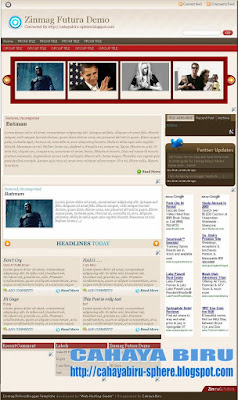
This day, I would like to launch Zinmag Futura Blogger Template. This template is originally from WP Theme and made by Jinsona. Then I convert it to Blogger Tempate.

Thanks dude... for creating a very nice WP Themes.

Overview:
Name : Blogger Template Zinmag Futura
Original From : Zinmag Futura WP THEME
Original Author : Jinsona Designs
Converted to blogger by : Cahaya Biru

Template Feature :
1. Magazine Style with inline posting
2. Auto readmore included
3. Glide Content with up-down toggler
4. Slider with right-left toggler
5. Featured Post
6. Nice Chocolate Twitter Header
7. Post Focus included**
8. Menu

**Post Focus, its mean that you will not see the Slide, Glide, and Featured section when you enter the single post article. I have another name of it "You can see me in front, but not in behind"... heheheh :D

Any theory about it?? tell me...

Clearly, The Slide, Glide, and Featured secton is all gone when you enter the single post article. Isn't it very nice dude .... :)


Clean and Nice Organized of Futura Page Element

On the other hand, when you go to page element, You will not see any pictures in there. This page element is really private setting for you... It is clean and well organized as a framework of your blog. In the same time, The featured, Glide, and Slide section, is locked. Every widget that locked have the same color with the background. So that you can not remove or drag-drop. Why?? Just because They are the special widgets of Zinmag Futura.

You could change the setting, but we are not recommend it, only if you know about HTML code. I bet you know better than me... :) how much.... 20 bucks...100 bucks... heheheh just kidding about the bet. I don't like gambling either... it is forbidden in my believe... :)

This template has been tested in following browser :
1. Mozilla 2.xx (running well, no overflow, but the slide link is not shown)
2. mozilla 3.0x (perfect)
3. Internet Explorer 6 (running well, no overflow, but png image not shown)
4. Opera 9.0 (find)
That old browser is only tested tools. New Versions of it will show better.


Let's see the demo, from your computer, right guys.... !!! :D


Customizing Featured Widget (MANUALLY)


Oh.... well... now we are here.... Customizing Every Featured in Futura.

The Blogger Template Zinmag Futura is different from its versions in WP Theme. In WP themes, you can set all features into control panel by “semi-automatically”. But, in here, blogger, Zinmag Futura have to set manually.

Now I would like to explain how to customize the featured.

Customizing Menu
0. Go to Layout -- Edit HTML
1. Find (Ctrl+F) this
  • SUB-TITLE-LINK-ADDRESS
  • GROUP-TITLE-LINK-ADDRESS
2. Change it with your own targeted link.
3. Then, you have to change the title that inline the link, you will see:
  • GROUP TITLE
  • SUB TITLE
  • FRONT TITLE
  • SUB FRONT
4. Change it with your own title

5. Save the template

Customizing TWITTER
1. Go to EDIT/HTML, click expand widget template
2. find (Ctrl+F) this word:
TWITTER-ID-TWITTER
3. change all that word with your ID
4. Save The Template

example:
<script src='http://twitter.com/javascripts/blogger.js' type='text/javascript'/>
<script src='http://twitter.com/statuses/user_timeline/cahayabiru.json?callback=twitterCallback2&amp;count=5' type='text/javascript'/>

After That, Go to Add Page Element Tab, then read the explanation below.

Customizing The Slide (below the menu) :
The content in slide widget have a structure. I will explain to you the structure of image slide , please read below :

<!-- *********** BEGIN OF PER CONTENT *********** -->
<div class="panel">
<img width="200" src="IMAGE-SOURCE-ADDRESS-HERE" height="120"/>
<h2><a href="YOUR-LINK-ADDRESS-HERE" title="Batman">TITLE LINK HERE</a></h2>
</div>
<!-- *********** END OF PER CONTENT *********** -->

change the word :
"YOUR-LINK-ADDRESS" with your own targeted link
"IMAGE-SOURCE-ADDRESS-HERE" with your own hosted image
"TITLE LINK HERE" with your own word. It will appear in the web
And Remember, the size of picture is 200px width and 120px height

If you want to add more slide, just copy-paste another one of the structure above, then edit image source address, title link, and link address.

In Futura, The structure have to like that.
You could change it, but we are not recommend it, only if you understand javascript that have set by Jinsona Design.

The example of slide (5 content) :

<!-- *********** BEGIN COPY *********** -->

<div class="panel">
<img width="200" src="http://web2feel.com/futura/wp-content/uploads/bats.jpg" height="120"/>
<h2><a href="http://futura-demo.blogspot.com/2009/02/dont-cry.html" title="Batman">Batman</a></h2>
</div>

<div class="panel">
<img width="200" src="http://web2feel.com/futura/wp-content/uploads/obama.jpg" height="120"/>
<h2><a href="http://futura-demo.blogspot.com/2009/02/dont-cry.html" title="Obama">Obama</a></h2>
</div>

<div class="panel">
<img width="200" src="http://web2feel.com/futura/wp-content/uploads/britney.jpg" height="120"/>
<h2><a href="http://futura-demo.blogspot.com/2009/02/dont-cry.html" title="Test postin paragraphs and words">Test postin paragraphs and words</a></h2>
</div>

<div class="panel">
<img width="200" src="http://web2feel.com/futura/wp-content/uploads/pitts.jpg" height="120"/>
<h2><a href="http://futura-demo.blogspot.com/2009/02/dont-cry.html" title="Post with links">Post with links</a></h2>

</div>

<div class="panel">
<img width="200" src="http://web2feel.com/futura/wp-content/uploads/shooter.jpg" height="120"/>
<h2><a href="http://futura-demo.blogspot.com/2009/02/dont-cry.html" title="An ordered list">An ordered list</a></h2>
</div>

<!-- *********** END OF COPY *********** -->


Customizing The Featured Post :

The featured post is a place that make your reader know about your featured post. In this Zinmag Futura, The featured post is recommended only for one content.

The Structured of content in featured post widget :

<!-- *********** BEGIN OF PER CONTENT *********** -->

<span class="cat"> Posted under <a href="YOUR-LABEL-LINK-ADDRESS" title="View all posts in Featured" rel="category">LABEL-TITLE</a> </span>
<h2><a href="YOUR-TARGETED-LINK-HERE" title="Batman is back">TITLE-HERE</a></h2>

<div class="fentry">

<p> <a href="YOUR-IMAGE-LINK"><img class="alignnone size-full wp-image-28" title="batmans" src="http://web2feel.com/demo5/wp-content/uploads/batmans.jpg" alt="" width="240" height="150" /></a> TEASER-TEXT-OR-SHORT-PARAGRAPH ---- HERE
</p>

<div class="featmeta"> <a href="YOUR-TARGETED-LINK-HERE">Read More</div>

<!-- *********** END OF PER CONTENT *********** -->

Change all word :
  • YOUR-LABEL-LINK-ADDRESS with your label address of article
  • YOUR-IMAGE-LINK with your own image hosted link
  • TEASER-TEXT-OR-SHORT-PARAGRAPH with your own article text
  • YOUR-TARGETED-LINK with your post article that related with teaser text.

The Example Content of Featured Widget :

<span class="cat"> Posted under <a href="http://web2feel.com/demo5/?cat=8" title="View all posts in Featured" rel="category">Featured</a> </span>
<h2><a href="http://web2feel.com/demo5/?p=19" title="Batman is back">Batman is back</a></h2>

<div class="fentry">

<p> <img class="alignnone size-full wp-image-28" title="batmans" src="http://web2feel.com/demo5/wp-content/uploads/batmans.jpg" alt="" width="240" height="150" /> Lorem ipsum dolor sit amet, consectetuer adipiscing elit. Quisque sed felis. Aliquam sit amet felis. Mauris semper, velit semper laoreet dictum, quam diam dictum urna, nec placerat elit nisl in quam. Etiam augue pede, molestie eget, rhoncus at, convallis ut, eros. Aliquam pharetra. Nulla in tellus eget odio sagittis blandit. Maecenas at nisl. Nullam lorem mi, eleifend a, fringilla vel, semper at, ligula. Mauris eu wisi. Ut ante dui, aliquet nec, congue non, accumsan sit amet, lectus. Mauris et mauris. Duis sed massa id mauris pretium venenatis. Suspendisse cursus velit vel ligula. Mauris elit. Donec neque. Phasellus nec sapien quis pede facilisis suscipit. Aenean quis risus sit amet eros volutpat ullamcorper. Ut a mi. Etiam nulla. Mauris interdum.</p>

<div class="featmeta"> <a href="http://web2feel.com/demo5/?p=19">Read More</div>

Customizing The Glide in Futura
The Futura Glide is a featured above main post area that have up-down toggler. When you click the toggler, the content will change up and down.

The Structure Of Per Content Of Futura Glide :

<div class="glidecontent">
<span class="cats"> <a href="YOUR-LINK-ADDRESS-HERE" rel="category" title="View all posts in Featured">TITLE-HERE</a>, <a href="LABEL-LINK ADDRESS-HERE" rel="category" title="View all posts in Uncategorized">CATEGORIES OR LABEL HERE</a> </span>
<h2><a href="YOUR-TARGETED-LINK-HERE" title="Batman">TITLE HERE</a></h2>
<div class="hentry">
<img width="200" src="IMAGE-ADDRESS-HERE" height="120"/>
<p>TEASER TEXT OR SHORT PARAGRAPH HERE [...]</p>
</div>
</div>


Example Content Of Glide in Futura (3 content) :


<!-- *********** Begin Copy *********** -->
<div class="glidecontent">
<span class="cats"> <a href="http://web2feel.com/futura/?cat=8" rel="category" title="View all posts in Featured">Featured</a>, <a href="http://web2feel.com/futura/?cat=1" rel="category" title="View all posts in Uncategorized">Uncategorized</a> </span>
<h2><a href="http://web2feel.com/futura/?p=42" title="Batman">Batman</a></h2>
<div class="hentry">
<img width="200" src="http://web2feel.com/futura/wp-content/uploads/bats.jpg" height="120"/>
<p>Lorem ipsum dolor sit amet, consectetuer adipiscing elit. Quisque sed felis. Aliquam sit amet felis. Mauris semper, velit semper laoreet dictum, quam diam dictum urna, nec placerat elit nisl in quam. Etiam augue pede, molestie eget, rhoncus at, convallis ut, eros. Aliquam pharetra. Nulla in tellus eget odio sagittis blandit. Maecenas at nisl. Nullam lorem [...]</p>
</div>
</div>

<div class="glidecontent">
<span class="cats"> <a href="http://web2feel.com/futura/?cat=8" rel="category" title="View all posts in Featured">Featured</a>, <a href="http://web2feel.com/futura/?cat=1" rel="category" title="View all posts in Uncategorized">Uncategorized</a> </span>
<h2><a href="http://web2feel.com/futura/?p=42" title="Batman">Batman</a></h2>
<div class="hentry">
<img width="200" src="http://web2feel.com/futura/wp-content/uploads/bats.jpg" height="120"/>
<p>Lorem ipsum dolor sit amet, consectetuer adipiscing elit. Quisque sed felis. Aliquam sit amet felis. Mauris semper, velit semper laoreet dictum, quam diam dictum urna, nec placerat elit nisl in quam. Etiam augue pede, molestie eget, rhoncus at, convallis ut, eros. Aliquam pharetra. Nulla in tellus eget odio sagittis blandit. Maecenas at nisl. Nullam lorem [...]</p>
</div>
</div>

<div class="glidecontent">
<span class="cats"> <a href="http://web2feel.com/futura/?cat=8" rel="category" title="View all posts in Featured">Featured</a>, <a href="http://web2feel.com/futura/?cat=1" rel="category" title="View all posts in Uncategorized">Uncategorized</a> </span>
<h2><a href="http://web2feel.com/futura/?p=42" title="Batman">Batman</a></h2>
<div class="hentry">
<img width="200" src="http://web2feel.com/futura/wp-content/uploads/bats.jpg" height="120"/>
<p>Lorem ipsum dolor sit amet, consectetuer adipiscing elit. Quisque sed felis. Aliquam sit amet felis. Mauris semper, velit semper laoreet dictum, quam diam dictum urna, nec placerat elit nisl in quam. Etiam augue pede, molestie eget, rhoncus at, convallis ut, eros. Aliquam pharetra. Nulla in tellus eget odio sagittis blandit. Maecenas at nisl. Nullam lorem [...]</p>
</div>
</div>

<!-- *********** END OF COPY *********** -->


PLEASE DO NOT REMOVE THE FOOTER CREDIT...
Creative Commons License
Zinmag Futura Blogger Template by Cahaya Biru is licensed under a Creative Commons Attribution 3.0 United States License.
Based on a work at cahayabiru-sphere.blogspot.com.
Permissions beyond the scope of this license may be available at http://www.cahayabiru.com/2009/02/blogger-template-zinmag-futura.html.


that's all guys... Any question or comments, leave in comments box below.... If you like my work and want to help me increase this blog .. . you could press donate button .... :) :) ...

ENJOY THE FUTURA ........ :)

Zinmag Redux


The full versions of redux (based on the WP THEME) maybe is to complicated for some blogger, and they don't want to used it. Set these, set those, ohhh.... boring.... boring....:)

Based on that issue, I give you the Easy Versions of Redux. And I call it The Redux Version 2.

This Redux is Free.... no paypal account... or alike... However if you want to donate me, you can click donate button.... heheheheh.... hahahah :D


FOR SHORT

Just Upload the XML file.

Set The tabber
1. Go to Add page element
2. you will see 1 2 3
  • Number 1 is Feed Gadget; set the title, and fill in the form with your feeds address
example: http://YOUR-BLOG.blogspot.com/feeds/posts/default/
  • number 2 is HTML Gadget. Use it for your own purpose
  • Number 3 is Label.

Customizing The Menu
1. go to Edit HTML,
2. find (Ctrl+F) this
  • SUB-TITLE-LINK-ADDRESS
  • GROUP-TITLE-LINK-ADDRESS
3. change all that word with your targeted link address.
4. Then, change the SUB TITLE or GROUP TITLE which inline with your link .

THEN YOU ARE DONE ....

see yaaaa.........

Zinmag Redux (Full Featured)


Logo of Zinmag Redux


First time I saw Zinmag series is WP Zinmag Redux. I was impressed with its feature, inline minipost, Glide Content, and tabber :). I was newbie that time, maybe a baby blog...and I still didn't know how to convert WP Theme to Blogger Template. :). In that time, I was dreaming if there is anyone who can convert this WP Themes to Blogger Template. Now, I am not dreaming anymore. I convert it for you... :)

Enough for the story, now, I am going to launch Zinmag Redux to Blogger Template.

This Redux is Free.... no paypal account... or alike... However if you want to donate me, you could press the donate button in my sidebar...... :) heheheheh.... hahahah :D

The Feature Of Zinmag Redux Versions 1.0 :
1. Featured Content (Manually)
2. Glide Content (Manually)
3. Feed Icon on top
4. Menu
5. Inline Minipost (Magazine Style)
6. Tabber Tab (Locked)
7. Widget in Bottom (Locked)


CUSTOMIZING THE FEATURE OF REDUX


Set The tabber
1. Go to Add page element
2. you will see 1 2 3
  • Number 1 is Feed Gadget; set the title, and fill in the form with your feeds address
example: http://YOUR-BLOG.blogspot.com/feeds/posts/default/
  • number 2 is HTML Gadget. Use it for your own purpose
  • Number 3 is Label.

Customizing The Menu
1. go to Edit HTML,
2. find (Ctrl+F) this
  • FRONT-TITLE
  • SUB-FRONT-TITLE
  • SUB-TITLE-LINK-ADDRESS
  • GROUP-TITLE-LINK-ADDRESS
3. change all that word with your targeted link address.
4. Then, change the SUB TITLE or GROUP TITLE, that inline, with your own link .

Customizing Archive Widget
We recommend to set flat list, instead of hierarchy without post title include
example : January 2009 or Jan 2009


Customizing Featured Widget ( MANUALLY)


The Structured of content in featured widget :

<span class="cat"> Posted under <a href="http://YOUR-LABEL-LINK-ADDRESS" title="View all posts in Featured" rel="category">LABEL-TITLE</a> </span>
<h2><a href="YOUR-TARGETED-LINK-HERE" title="TITLE-HERE">TITLE-HERE</a></h2>

<div class="fentry">

<p> <a href="YOUR-IMAGE-LINK"><img class="alignnone size-full wp-image-28" title="batmans" src="http://web2feel.com/demo5/wp-content/uploads/batmans.jpg" alt="" width="240" height="150" /></a>
TEASER-TEXT-OR-SHORT-PARAGRAPH ---- HERE
</p>

<div class="featmeta"> <a href="YOUR-TARGETED-LINK-HERE">Read More</div>


The Example Content of Featured Widget :


<!-- ************ BEGIN COPY OF EXAMPLE FEATURED CONTENT *********** -->

<span class="cat"> Posted under <a href="http://web2feel.com/demo5/?cat=8" title="View all posts in Featured" rel="category">Featured</a> </span>
<h2><a href="" title="Batman is back">Batman is back</a></h2>

<div class="fentry">


<p> <img class="alignnone size-full wp-image-28" title="batmans" src="http://web2feel.com/demo5/wp-content/uploads/batmans.jpg" alt="" width="240" height="150" /> Lorem ipsum dolor sit amet, consectetuer adipiscing elit. Quisque sed felis. Aliquam sit amet felis. Mauris semper, velit semper laoreet dictum, quam diam dictum urna, nec placerat elit nisl in quam. Etiam augue pede, molestie eget, rhoncus at, convallis ut, eros. Aliquam pharetra. Nulla in tellus eget odio sagittis blandit. Maecenas at nisl. Nullam lorem mi, eleifend a, fringilla vel, semper at, ligula. Mauris eu wisi. Ut ante dui, aliquet nec, congue non, accumsan sit amet, lectus. Mauris et mauris. Duis sed massa id mauris pretium venenatis. Suspendisse cursus velit vel ligula. Mauris elit. Donec neque. Phasellus nec sapien quis pede facilisis suscipit. Aenean quis risus sit amet eros volutpat ullamcorper. Ut a mi. Etiam nulla. Mauris interdum.</p>

<div class="featmeta"> <a href="">Read More</div>

<!-- ************ END COPY OF EXAMPLE *********** -->


Customizing Glide Content

The structure per content of HTML in Redux is shown below:

<!-- ************ PER CONTENT START *********** -->

<div class="glidecontent">

<h2><a href="Change-with-your-targeted-link" title="title-here">text that show in web</a></h2>
<span class="cats"> Posted under <a href="http://YOUR-BLOG-ADDRESS-HERE.blogspot.com/search/label/TITLE-OF-YOUR-LABEL" rel="category" title="title-here">Label-SHOWN-IN-WEB</a> </span>

<div class="hentry">


<img width="200" src="YOUR-IMAGE-ADDRESS-HERE" height="120"/>

<p>TEASER-TEXT-HERE- MAYBE-SHORT-PARAGRAPH-OR-SHORT-SUMMARY[...]</p>

</div>

</div>

<!-- *********** END OF PER CONTENT *********** -->


If you in hurry, you could copy this code below, then paste into the Glider HTML Javascript in your page element


<!-- *********** start copy ************** -->

<div class="glidecontent">

<h2><a href="http://redux-demo.blogspot.com/2009/02/another-test-2.html" title="iPhone Apps">iPhone Apps</a></h2>
<span class="cats"> Posted under <a href="http://redux-demo.blogspot.com/search/label/test%20for%20you" rel="category" title="View all posts in Downloads">Downloads</a> </span>

<div class="hentry">

<img width="200" src="http://web2feel.com/demo5/wp-content/uploads/iphone.jpg" height="120"/>

<p>Lorem ipsum dolor sit amet, consectetuer adipiscing elit. Quisque sed felis. Aliquam sit amet felis. Mauris semper, velit semper laoreet dictum, quam diam dictum urna, nec placerat elit nisl in quam. Etiam augue pede, molestie eget, rhoncus at, convallis ut, eros. Aliquam pharetra. Nulla in tellus eget odio sagittis blandit. Maecenas at nisl. Nullam lorem [...]</p>
</div>


</div>

<div class="glidecontent">

<h2><a href="http://redux-demo.blogspot.com/2009/02/another-test-2.html" title="Britney is back">Britney is back</a></h2>
<span class="cats"> Posted under <a href="http://redux-demo.blogspot.com/search/label/test%20for%20you" rel="category" title="View all posts in music">music</a> </span>
<div class="hentry">
<img width="200" src="http://web2feel.com/demo5/wp-content/uploads/britney.jpg" height="120"/>
<p>Lorem ipsum dolor sit amet, consectetuer adipiscing elit. Quisque sed felis. Aliquam sit amet felis. Mauris semper, velit semper laoreet dictum, quam diam dictum urna, nec placerat elit nisl in quam. Etiam augue pede, molestie eget, rhoncus at, convallis ut, eros. Aliquam pharetra. Nulla in tellus eget odio sagittis blandit. Maecenas at nisl. Nullam lorem [...]</p>
</div>
</div>


<div class="glidecontent">
<h2><a href="http://redux-demo.blogspot.com/2009/02/another-test-2.html" title="Financial crunch effect on US politics">Financial crunch effect on US politics</a></h2>
<span class="cats"> Posted under <a href="http://redux-demo.blogspot.com/search/label/test%20for%20you" rel="category" title="View all posts in politics">politics</a> </span>
<div class="hentry">
<img width="200" src="http://web2feel.com/demo5/wp-content/uploads/obama1.jpg" height="120"/>
<p>Lorem ipsum dolor sit amet, consectetuer adipiscing elit. Quisque sed felis. Aliquam sit amet felis. Mauris semper, velit semper laoreet dictum, quam diam dictum urna, nec placerat elit nisl in quam. Etiam augue pede, molestie eget, rhoncus at, convallis ut, eros. Aliquam pharetra. Nulla in tellus eget odio sagittis blandit. Maecenas at nisl. Nullam lorem [...]</p>
</div>
</div>

<div class="glidecontent">
<h2><a href="http://redux-demo.blogspot.com/2009/02/another-test-2.html" title="Batman is back">Batman is back</a></h2>
<span class="cats"> Posted under <a href="http://web2feel.com/demo5/?cat=8" rel="category" title="View all posts in Featured">Featured</a> </span>
<div class="hentry">
<img width="200" src="http://web2feel.com/demo5/wp-content/uploads/bats.jpg" height="120"/>
<p>Lorem ipsum dolor sit amet, consectetuer adipiscing elit. Quisque sed felis. Aliquam sit amet felis. Mauris semper, velit semper laoreet dictum, quam diam dictum urna, nec placerat elit nisl in quam. Etiam augue pede, molestie eget, rhoncus at, convallis ut, eros. Aliquam pharetra. Nulla in tellus eget odio sagittis blandit. Maecenas [...]</p>
</div>
</div>

<div class="glidecontent">
<h2><a href="http://redux-demo.blogspot.com/2009/02/another-test-2.html" title="Action Games">Action Games</a></h2>
<span class="cats"> Posted under <a href="http://redux-demo.blogspot.com/search/label/test%20for%20you" rel="category" title="View all posts in Childcare">Childcare</a>, <a href="http://redux-demo.blogspot.com/search/label/test%20for%20you" rel="category" title="View all posts in Downloads">Downloads</a>, <a href="http://redux-demo.blogspot.com/search/label/test%20for%20you" rel="category" title="View all posts in Dvd">Dvd</a>, <a href="http://redux-demo.blogspot.com/search/label/test%20for%20you" rel="category" title="View all posts in Games">Games</a>, <a href="http://redux-demo.blogspot.com/search/label/test%20for%20you" rel="category" title="View all posts in Software">Software</a> </span>

<div class="hentry">
<img width="200" src="http://web2feel.com/demo5/wp-content/uploads/batista.jpg" height="120"/>
<p>Lorem ipsum dolor sit amet, consectetuer adipiscing elit. Quisque sed felis. Aliquam sit amet felis. Mauris semper, velit semper laoreet dictum, quam diam dictum urna, nec placerat elit nisl in quam. Etiam augue pede, molestie eget, rhoncus at, convallis ut, eros. Aliquam pharetra. Nulla in tellus eget odio sagittis blandit. Maecenas at nisl. Nullam lorem [...]</p>
</div>
</div>

<div class="glidecontent">
<h2><a href="http://redux-demo.blogspot.com/2009/02/another-test-2.html" title="Post with links">Post with links</a></h2>
<span class="cats"> Posted under <a href="http://redux-demo.blogspot.com/search/label/test%20for%20you" rel="category" title="View all posts in Featured">Featured</a>, <a href="http://web2feel.com/demo5/?cat=19" rel="category" title="View all posts in Uncategory">Uncategory</a> </span>
<div class="hentry">
<img width="200" src="http://web2feel.com/demo5/wp-content/uploads/music.jpg" height="120"/>
<p>This is the web2feel wordpress theme demo site. You have come here from our home page.<br/>
Explore the Theme preview and inorder to RETURN to the web2feel home page CLICK HERE</p>
</div>
</div>

<!-- *********** End of the example *********** -->


AFTER REDUX, THERE WILL BE FUTURA AND MONEZINE ........

Forex Press

If I see green color, my mind directly connect with nature, tree and leaf. :). But this green is difference. it is related with money. hahahah...
In my country, money is not only in green but also in red, blue, and brown.
Again, hahahah.... Green is just metaphor right....!! just kidding men, just kidding....:).

By the way, as new comer, I would like to Introduce Forex Press V. 1.0 Blogger Template that I have converted from Word Press for you.


This template has been tested in :
  1. Internet Explorer 6. (new versions will view it best, like IE 8)
  2. Mozilla Firefox 2.xx (new versions will view it best, like Firefox 3.xx)
  3. Opera 9.0 (new versions will view best)
After Downloading, please leave a comment below..... yeah... ...........:)

FOREX PRESS GUIDE :
1. Customizing the FeedBurner Form
  • Go to LAYOUT -- Edit HTML -- No need to expand widget
  • find (CTRL+F) this word :

YOUR-FEEDBURNER-ID


Change it with your own ID. For Example: CahayaBirusSphere

2. Customizing the Menu

Here is the HTML Structure of per menu.
<li><a href='POST-LINK-LOCATION' title='POST-TITLE'> POST-TITLE </a></li>

You can add more menu link by copy-paste under the previous one.
Also, You can edit it in wordprocessor or notepad.

Change the words
  • POST-LINK-LOCATION with your own link
  • POST-TITLE with your own title. The first POST TITLE is hover text. It will show when your mouse put over the link. The second is Text title which can be shown in web.

After that editing, ,
  • Go to LAYOUT -- Add Page Element
  • you will see FOX MENU
  • Press edit
  • Then fill it with yours which just have been edited...
  • Save your template.

For the rest instructions, you can read it in the package.


The files is UPDATED IN 10 April 2009


PLEASE DO NOT REMOVE THE FOOTER CREDIT


Creative Commons License
Forex Press by Cahaya Biru is licensed under a Creative Commons Attribution 3.0 United States License.
Based on a work at cahayabiru-sphere.blogspot.com.
Permissions beyond the scope of this license may be available at http://www.cahayabiru.com/2009/01/blogger-template-forex-press.html.

Blog Archive

Free Blogger Template Cahaya Biru

Followers

Search This Blog